

Some unfinished tasks are not unfinished because you are avoiding them. They are unfinished because the next move is not yours yet.
You are waiting for a reply. A refund has not arrived. Someone else needs to confirm a date. A document has been submitted and there is nothing useful to do until it comes back.
The problem is that your attention may keep treating those items as active anyway. They sit beside tasks you can move, so everything starts to feel equally urgent.
You do not need to finish every open loop to feel clearer. You need a better way to separate what still needs you from what can safely wait.
Why waiting tasks can feel strangely heavy
A normal to-do list is very good at recording what exists. It is less good at showing whether an item is actually actionable right now.
That matters because these two items are not the same:
- Send the insurance form — you can act on this.
- Wait for the insurance company to reply — you cannot move this yet.
If both stay on the same active list, your mind can keep rechecking the second item even though no useful action is available.
After enough of these waiting points accumulate, the list becomes less like a plan and more like a room full of people all asking for your attention at once.
A gentle next step
If unfinished thoughts are part of the friction
Open Loop Rescue gives tasks, decisions, requests, and waiting items one private place to land so you can see what still needs you.
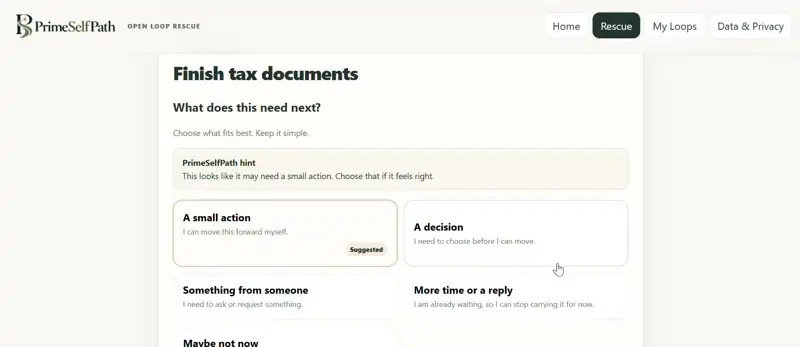
Real Open Loop Rescue screen · the tool helps turn a vague open loop into the kind of next move it actually needs.
See how Open Loop Rescue works →Step 1: Ask one question before you do anything
For each unfinished item, ask:
“Can I actually move this forward right now?”
If the answer is yes, it belongs in your active field.
If the answer is no, do not leave it pretending to be a task. Give it a more accurate state.
Step 2: Separate action from waiting
A useful split is simple:
- Action: there is a concrete move you can make now.
- Waiting: someone or something else has the next move.
- Decision: the item is stuck because you have not chosen yet.
- Request: progress depends on asking someone for something.
- Park: it matters, but not now.
- Let go: it no longer deserves your attention.
This is one reason a long list can still feel noisy. The list may contain six completely different kinds of open loops but display them as if they all need the same treatment.
If that sounds familiar, our guide on how to clear mental clutter goes deeper into reducing the number of things competing for active attention.
One Useful Note
Get the 3-question mental load reset.
A tiny reset for deciding what needs action, what can wait, and what can leave your attention. Then get occasional practical PrimeSelfPath notes, not daily noise.
Free · useful emails only · unsubscribe anytime.
Step 3: Give waiting items a condition for returning
“Waiting” should not mean “keep checking it mentally all day.”
Give the item a condition for when it becomes active again. For example:
- Check again on Friday.
- Revisit if there is no reply within seven days.
- Wait until the refund deadline passes.
- Return to this after the meeting.
The goal is not to schedule every detail of your life. It is to give your brain a reason to stop treating the item like an emergency that might disappear if you stop thinking about it.
Step 4: Turn vague waiting into a specific state
“Insurance stuff” is hard to relax around because it is unclear.
“Waiting for the insurance company to reply to the form sent Tuesday” is much easier to place.
Clarity is often more calming than completion.
Try rewriting vague open loops:
- “Refund” becomes “Waiting for refund from store.”
- “Doctor” becomes “Waiting for clinic to confirm appointment.”
- “Project” becomes “Waiting for Sam to approve the draft.”
- “Subscription” becomes “Decision: cancel or keep before renewal date.”
Once the state is clear, the next step becomes clearer too.
Step 5: Keep your active field small
Your active field is the small set of things that genuinely need something from you now.
It is not your entire life. It is not every promise, idea, future task, waiting point, and unfinished thought you have ever captured.
If ten items are waiting on other people and three items are actionable, your active field should look closer to three than thirteen.
This is where many people accidentally create decision fatigue. Too many items remain visually and mentally active, so choosing where to begin becomes harder than the work itself.
A five-minute reset for things you cannot act on yet
Minute 1: Capture the waiting items
Write down anything you keep mentally checking even though the next move may belong to someone else.
Minute 2: Confirm who has the next move
Ask whether the item needs action from you, a reply from someone else, a decision, or simply more time.
Minute 3: Add a return condition
Choose when the item deserves your attention again.
Minute 4: Remove fake urgency
Move waiting and parked items away from your main active list.
Minute 5: Choose one thing that still needs you
From what remains, choose one concrete move you can make now.
You are not trying to empty your entire backlog. You are reducing the number of open loops asking for attention at the same time.
What if you keep thinking about the waiting task anyway?
That can happen, especially when the outcome matters.
Do not respond by checking it every few minutes. Instead, verify three things:
- Is the next move clearly assigned?
- Do you know when you will revisit it?
- Is there any useful action you have genuinely missed?
If the answer to the first two is yes and the third is no, the task is allowed to stay quiet.
You can care about an outcome without keeping it in active attention all day.
A normal to-do list cannot always show this difference
If your list is accurate but still feels heavy, read Mental Load vs To-Do List for a simple way to separate capture from active attention.
A traditional list may show:
- Finish tax documents
- Waiting for refund
- Cancel or keep subscription
- Reply from insurance
But those four items do not all need the same kind of attention.
One is action. One is waiting. One is a decision. One may already be out of your hands.
Open Loop Rescue was built around that distinction. It helps separate action, waiting, decisions, requests, parking, and letting go so fewer things remain mentally active at the same time.
It is not a full project-management system. It is a private browser tool for moments when too many loose ends are competing for attention and you need to know what still needs you.
The useful goal is not “finish everything”
Some things cannot be finished today. Some should not be finished today. Some do not need you at all until something changes.
The more useful goal is:
Know what is active, know what is waiting, and stop making both carry the same weight.
That is often enough to make the next move easier to see.
A practical next step
Need a clearer next move?
Open Loop Rescue is PrimeSelfPath’s private tool for unloading unfinished thoughts, separating what needs action from what can wait, and choosing one clear next move.
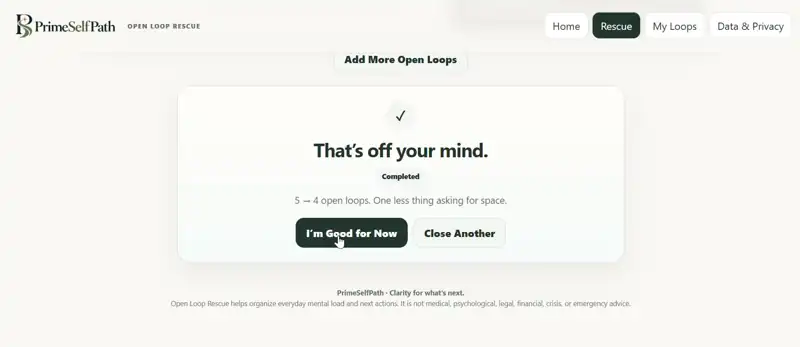
Real product screen · the goal is not a longer list. It is fewer things asking for space.
Explore Open Loop Rescue · $19One-time purchase · no subscription
PrimeSelfPath content is for practical everyday clarity and general informational purposes. It is not medical, psychological, crisis, legal, or financial advice.
